Amazon Product Description vs A+ Content: What to Write in Each Section
The Amazon product description is the listing’s text-based explanation and detail layer. Amazon A+ Content is the richer visual education, differentiation, and brand-story layer.
They have different jobs. Neither replaces the other.
Many sellers paste their bullets into the product description, then paste the same description into their A+ modules. The result is repetitive copy that still leaves important questions unanswered about care, fit, limitations, and real-world use.
Title, bullets, and main images handle the above-the-fold decision. The product description and A+ Content should add depth below it. The key is assigning each surface a clear role.
How product descriptions and A+ Content differ
Use this comparison as a planning framework, not as a ranking formula. Placement, eligibility, module availability, and policy rules change. Verify current Seller Central guidance before you write or submit.
- Job: product description = completeness and written clarity; A+ Content = visual education and product proof
- Format: description is text in the listing; A+ is modules with images, diagrams, and short copy
- Placement: description sits in the product information area; A+ sits in the enhanced content area below the fold
- Eligibility: descriptions are part of the catalog listing; A+ usually requires Brand Registry and current account access
- Shopper use: description answers written questions about materials, care, what’s included, and limitations; A+ shows use, construction, and why the product fits a routine
- Failure mode: repeating bullets in the description, then repeating the description in A+ modules
What belongs in the product description
The product description is the complete written record for the ASIN. It should add facts the title and bullets cannot hold without becoming crowded.
Include: materials and construction in plain language; dimensions, capacity, and compatibility; what’s in the box; care, cleaning, and storage; known limitations and who it is not for; variation differences when one listing covers more than one option.
Keep claims consistent with the title, bullets, and images. Do not paste the five bullets again. Do not write lifestyle slogans here. Do not make medical, ranking, or guarantee claims.
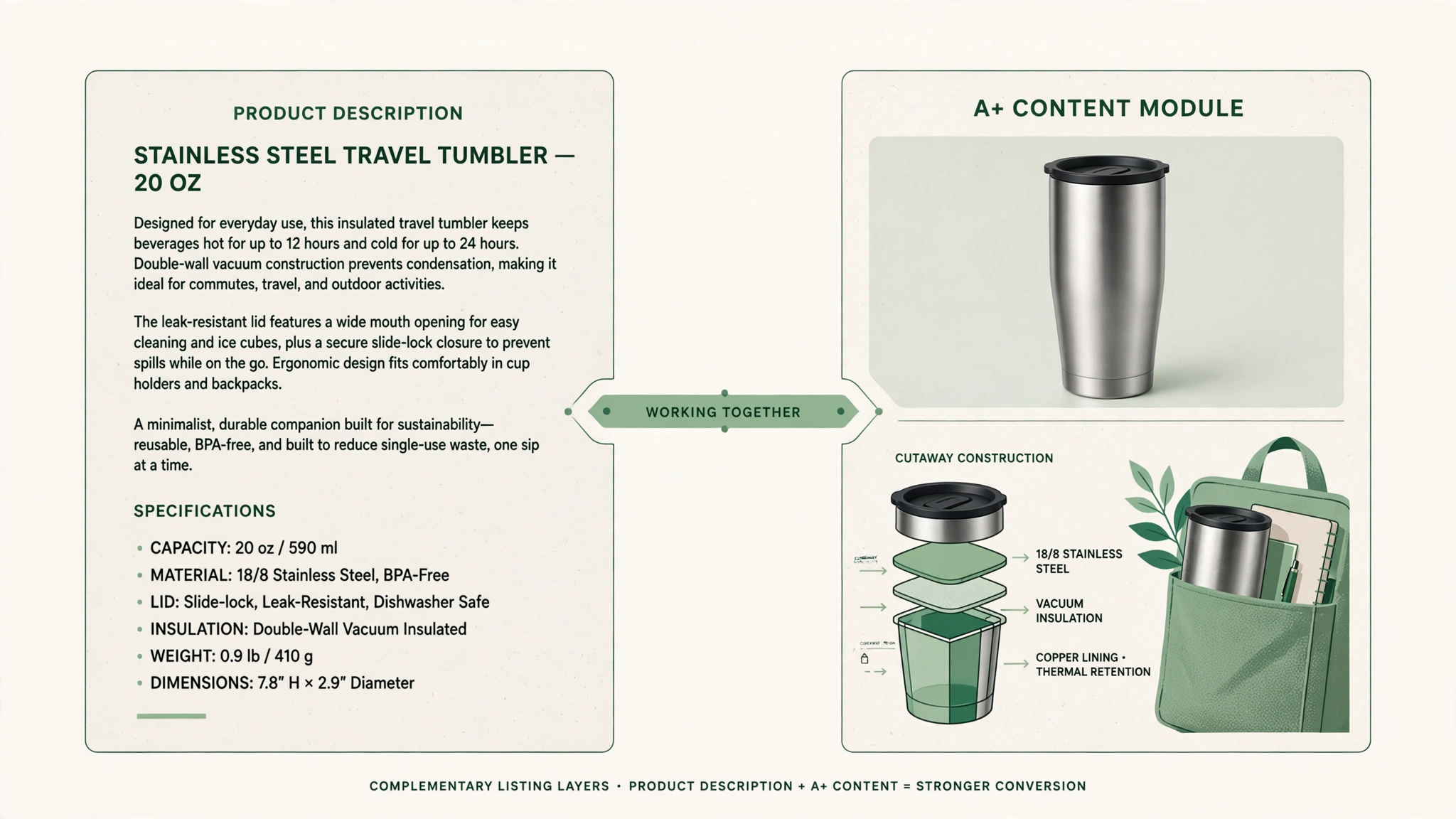
Example split using a travel tumbler: description can state “Double-wall 18/8 stainless steel,” capacity, lid type, and care instructions.
What belongs in A+ Content
A+ Content should educate with visuals and story. Plan modules around these shopper questions:
- What is this product?
- How is it used?
- What is it made of?
- What problem does it solve?
- What is included?
- Which version is right for me?
- Why should I trust this product?
Use-case scenes
Show the product where it earns the purchase. A baking mat on a sheet pan. A travel tumbler in a bag pocket. A desk lamp in a nighttime workspace. Keep the scene accurate. If the ASIN is one size, do not imply that every size is included. If the listing describes a home-use product, do not show it performing like commercial equipment.
Feature proof
Turn important features into something visible. Construction details, hinges, closures, ports, coatings, stitching, measurement marks, and layers can often be shown through close-ups or diagrams. The callout should give the feature a customer-facing meaning.
Example:
- Product description: “Double-wall 18/8 stainless steel.”
- A+ Content: A close-up or cutaway with the callout, “Double-wall construction helps the outer surface stay comfortable to hold.”
The same fact appears in both places, but it performs a different job.
Benefits
Connect features to real routines. Useful A+ benefit copy names the situation (commute, kitchen prep, overnight travel) and the outcome the shopper can see. Do not invent performance numbers. Do not restate bullets as benefit banners.
Specifications
Put the hard facts that shoppers compare, with labels that match the description. Dimensions, materials, compatibility, and included parts belong here as a visual chart or labeled diagram, not as a second essay.
Packaging and what’s included
Show the contents when that reduces returns or confusion. Keep the image honest. Do not show accessories that are sold separately unless the copy says so.
Lifestyle close
End with one accurate scene that matches the ASIN, not a brand manifesto.
How to split one product fact across both surfaces
Start with one evidence list from the live ASIN. For each fact, assign a job:
- Written completeness goes to the product description
- Visual proof, scene, or comparison goes to A+ Content
Review title, bullets, description, images, and A+ together. If two surfaces disagree, the listing needs correction even if both sentences sound polished.
A Seller Central workflow from one ASIN
- Open the live listing and capture title, bullets, description, images, variations, and Q&A.
- Build one evidence list. Mark each fact as description, A+, or both with different jobs.
- Rewrite the product description so it is complete and does not repeat bullets.
- Plan A+ modules around the seven shopper questions above. Map them to seven-role planning: hero story, construction trust, feature proof, benefits, specifications, packaging, and lifestyle close.
- Draft A+ copy and visuals from the evidence list. Keep claims identical in meaning to the description.
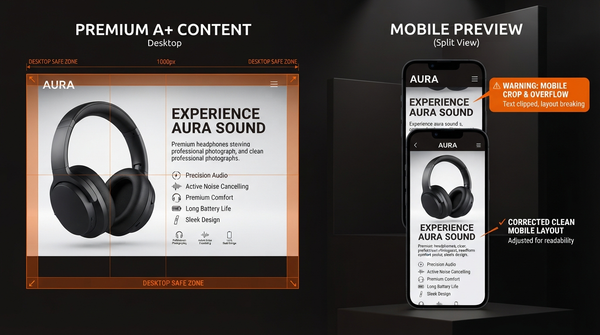
- Review mobile and desktop. Check text-safe areas, included contents, and variation accuracy.
- Submit A+ through Seller Central. Keep the product description as the listing’s written record. The seller remains in control of the handoff.
If you are not yet eligible for A+, keep the product description as the complete text layer and keep an evidence list for future A+ Content scenes and proof. Check current eligibility information in Seller Central rather than assuming access.
Frequently Asked Questions
How do I keep claims consistent?
Start with the ASIN and build one evidence list. Assign each fact a job, then review the title, bullets, description, images, and A+ Content together. If two surfaces disagree, the listing needs correction even if both sentences sound polished by themselves.
Does A+ Content replace the product description?
No. The product description remains the listing’s written record. A+ Content adds visual education below the fold.
What if I only have time for one surface?
Finish the product description first so the listing is complete in text. Keep an evidence list for A+ scenes and proof when you can produce it.
Can I paste the description into A+ modules?
Avoid that. Repeating the same copy leaves care, fit, limitations, and real-world use unanswered.
Plan both surfaces from the same ASIN
The core distinction is simple:
- Product description: completeness and written clarity
- A+ Content: visual education and product proof
You can manage this split in a spreadsheet, or begin with the live product page.
AMZAPLUS is a creative command center for the A+ side of that process. It starts with an ASIN, researches listing facts and customer context, and organizes evidence-led planning into a seven-role Premium A+ draft covering the hero story, construction, feature proof, benefits, specifications, packaging, and lifestyle close.
You still maintain the product description as the listing’s written record. You still review the creative and submit it through Seller Central. AMZAPLUS does not guarantee approval, rankings, conversions, or revenue.
Use the Amazon A+ Content Guide for the broader workflow and A+ Content Examples for visual inspiration. Keep the product description and A+ Content focused on different jobs so shoppers receive a complete listing instead of the same copy twice.
The next high-value step would be turning this article into a YouTube walkthrough that demonstrates the same product fact in both surfaces.