
Everything You Need to Know About Premium A+ Content: The Ultimate Amazon Guide
Introduction: Stand Out in Amazon's Crowded Battlefield
Picture this: a buyer lands on your Amazon detail page after a frantic search for the perfect widget. Ten similar listings stare back—same bullet points, stock photos, bland descriptions. Yours? It bursts alive with looping videos, interactive hotspots that reveal specs on hover, full-bleed images that tell your brand's origin story. That's the raw power of premium A+ content. In Amazon's cutthroat arena, where milliseconds decide conversions, Premium A+ isn't a luxury—it's your secret weapon.
If you're a professional Amazon seller, Brand Registry owner, or e-commerce agency juggling client ASINs, you've likely dabbled in Basic A+. But Premium A+ elevates your game: richer modules, autoplay videos, carousels that swipe smoothly on mobile. This Amazon Premium A+ guide is your definitive roadmap. We'll unpack what it is, eligibility hurdles, module mastery, pitfalls to dodge, and a game-changing tool to launch it fast. By the end, you'll wield Premium A+ like a pro, turning browsers into buyers.
What is Premium A+ Content?
At its core, what is premium A+ content? It's Amazon's elite tier of enhanced brand content, designed to transform static detail pages into dynamic, immersive experiences. Unlike standard images and text, Premium A+ unlocks a suite of advanced modules—think full-width hero videos, interactive elements, and comparison tables that load lightning-fast across devices.
Positioned as the upgrade to Basic A+, Premium A+ demands Brand Registry enrollment but rewards you with storytelling tools that Basic can't touch. It's not just prettier pictures; it's strategic real estate on your ASIN, where you control the narrative from problem to purchase. Amazon rolled this out to help enrolled brands differentiate, and savvy sellers use it to boost dwell time and trust signals that algorithms love.
Why the 'Premium' label? It reflects the polish: higher-res assets, fluid animations, and mobile-optimized layouts that feel native to the platform. In a sea of sameness, Premium A+ makes your listing the one shoppers linger on—and buy from.
Practical Takeaway
Audit your top ASINs today. If you're stuck on Basic A+, Premium A+ is your next conversion unlock—start by confirming Brand Registry status.
Basic A+ vs Premium A+: A Head-to-Head Comparison
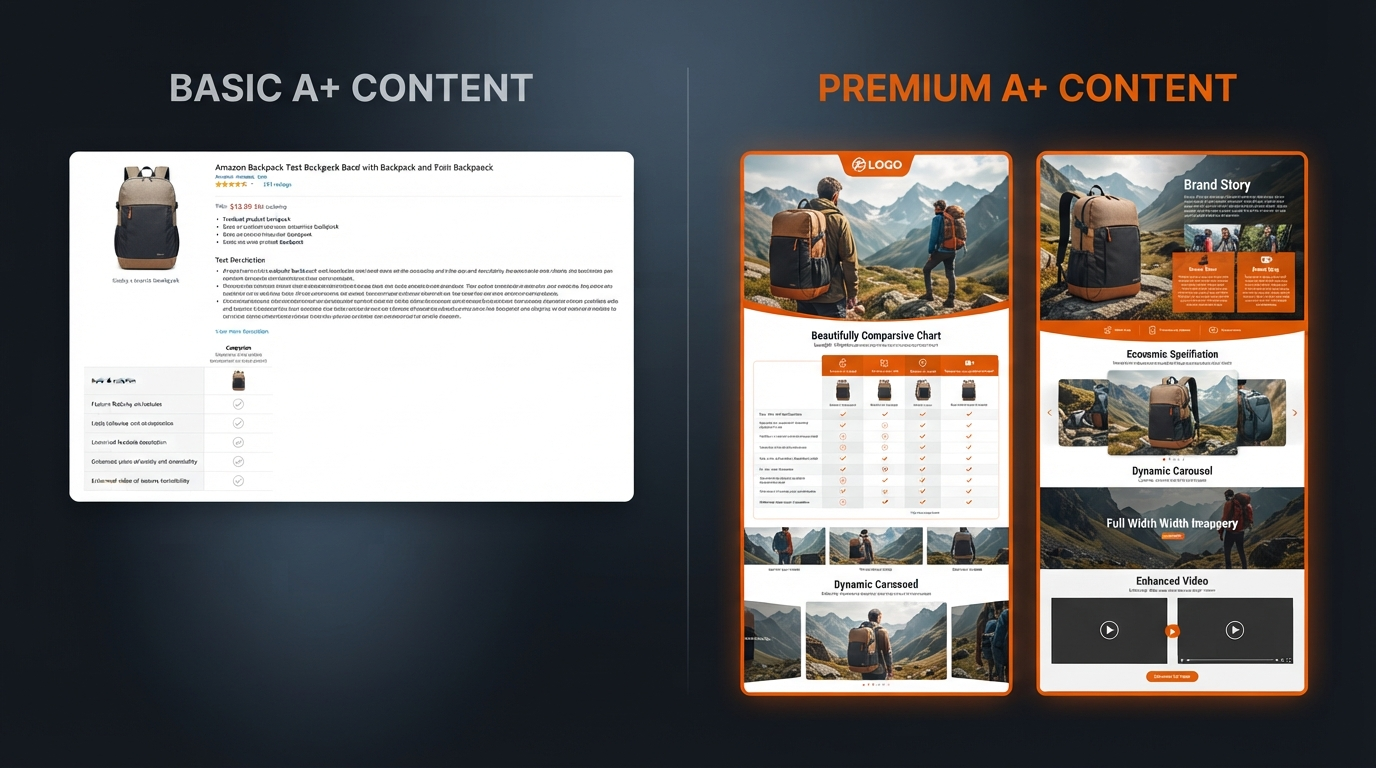
Basic A+ gets you started with images and text overlays, but Premium A+ is the Ferrari to its bicycle. The upgrade shines in interactivity and visual punch, driving why premium A+ benefits include stickier engagement. Here's a breakdown:
| Feature | Basic A+ | Premium A+ |
|---|---|---|
| Video Support | Static video thumbnails only | Autoplay full-width videos + video with text overlays |
| Imagery | Standard modular images | Full-bleed, background images, dual-image layouts |
| Interactivity | None | Hotspots, carousels, swipeable Q&A |
| Mobile Experience | Responsive but basic | Enhanced thumb-scroll, full-screen elements |
| Brand Story Integration | Limited | Premium brand story modules |
Premium converts better because it mirrors premium retail sites: videos autoplay to hook in seconds, hotspots let users explore without leaving the page, carousels keep them swiping. Mobile shoppers—over 70% of Amazon traffic—get a seamless, thumb-friendly flow that Basic can't match. Brands switching report smoother paths to 'Add to Cart'.
Practical Takeaway
Map your Basic A+ to Premium equivalents. Prioritize video and hotspots for your hero ASIN—expect noticeable engagement lifts.
Amazon Premium A+ Requirements: Your Eligibility Checklist
Unlocking premium A+ content starts with gates, but they're straightforward for qualified sellers. First: mandatory enrollment in Amazon Brand Registry. No shortcuts here—it's non-negotiable.
Next, publish your A+ Brand Story in Seller Central. This acts as a prerequisite, ensuring your brand assets are vetted. Account health matters too: maintain excellent metrics (low order defect rate, A-to-Z claims under control). Certain categories like groceries or digital goods may face restrictions, so check via Seller Central's A+ Content Manager.
- Brand Registry: Enroll with trademark.
- Brand Story: Live and approved.
- Account Standing: Good health rating.
- No Cost: Free to create and publish.
- ASIN Limits: Up to 7 modules per ASIN.
Once eligible, access opens in Seller Central under Advertising > A+ Content Manager. Pro tip: Test on a low-volume ASIN first to iron out kinks.
Practical Takeaway
Run a quick Brand Registry check. Publish that Brand Story today—it's your golden ticket to Premium A+.
The 7 Premium A+ Module Slots Explained: Build Your Perfect Stack
Amazon grants up to 7 Premium A+ module slots per ASIN, not just 7 types—mix and match for a custom flow. Think of it as stacking high-impact blocks: start with video hooks, layer in education, end with CTAs. Here's the powerhouse families, with best-use scenarios:
1. Premium Full Video & Video with Text
Autoplay hero videos (up to 120s) or synced text overlays. Best for: Product demos, unboxings. Captures attention instantly—pair with lifestyle footage for emotional pull.
2. Premium Full Image
Edge-to-edge visuals with optional text. Best for: Hero shots, infographics showcasing scale or texture.
3. Premium Background Image with Text (Single & Dual)
Layer copy over immersive BGs. Best for: Feature highlights, before-afters. Dual images split-test variants seamlessly.
4. Premium Hotspots (Interactive)
Clickable zones revealing pop-up details. Best for: Exploded views, spec deep-dives. Boosts interactivity without clutter.
5. Premium Comparison Table
Side-by-side specs vs. ideals (no direct competitors). Best for: Tech products, where data wins.
6. Premium Carousel
Swipeable galleries. Best for: Multi-angle shots, user stories.
7. Premium Q&A / Technical Specs
Expandable FAQs or tables. Best for: Objection-handling, SEO-boosting long-tail queries.
Optimal stack? Video opener, hotspots middle, carousel closer. Test sequences via A/B in Seller Central.
Practical Takeaway
Sketch your 7-slot blueprint: Video > Hotspots > Comparison > CTA carousel. Rotate based on A/B data.
Unlocking Premium A+ Benefits: Why It Pays to Invest Time
The premium A+ benefits stack up fast. Many brands see conversion lifts of 5-10% or more, as immersive content extends session times and builds trust. Videos educate visually, slashing confusion-driven returns—shoppers 'get it' before buying.
Brand storytelling shines: weave your origin into modules, forging loyalty beyond price. Mobile dominance is huge—optimized layouts convert thumb-scrollers who bounce from text walls. Finally, it's a defensive moat: competitors without Premium A+ look amateur next to your polish.
- Higher conversions through engagement.
- Fewer returns via clear education.
- Superior storytelling and recall.
- Mobile-first edge.
- Competitive barrier.
Practical Takeaway
Target your top 3 ASINs for Premium A+. Track conversions pre/post—many report quick wins.
5 Common Mistakes That Get Premium A+ Rejected or Waste Space
Even pros trip up. Avoid these to sail through approval:
- Generic Stock Content: Ditch clichés. Use authentic, branded visuals or risk rejection for low value.
- Compliance Ignores: No superlatives ('best ever'), warranties, or competitor jabs. Amazon's bots flag fast.
- Poor Mobile Optimization: Test thumb-scroll—cramped text kills it.
- Walls of Text: Brevity rules. Overlay sparingly; let images lead.
- Inconsistent Assets: Mismatched colors, fonts erode trust. Stick to brand guidelines.
Rejections sting—live previews save headaches.
Practical Takeaway
Self-audit with a compliance lens before upload. Fix one mistake per ASIN weekly.
From ASIN to Premium A+ in Minutes: Enter A+ Forge
Manual module building? Tedious. Enter A+ Forge, the creative command center from Premium AMZ A+. Paste an ASIN, and watch magic: Rainforest API pulls real-time listing data—images, bullets, descriptions.
Instant seven-module conceptualization generates tailored drafts. Desktop/mobile visual previews let you tweak. Built-in Compliance Desk flags risky language—'best seller'? Red alert. Review before you upload, then export for seamless handoff to Amazon's A+ Content Manager.
Workflow: ASIN to Premium A+ in under 10 minutes. Forge a draft, iterate, deploy. Agencies save hours vs. Photoshop marathons; solo sellers reclaim weekends. No design skills needed—it's your industrial forge for pixel-perfect content.
Practical Takeaway
Try A+ Forge free on a test ASIN. Experience ASIN to Premium A+ speed—your workflow will thank you.
Premium A+ Best Practices: Your Actionable Checklist
Nail execution with this checklist:
- Mobile-First Design: Test thumb-scroll on real devices. Full-width rules.
- Brand Consistency: Lock colors (#ED6407 accents), typography, 20px logo safe zones.
- Compliance-First Copy: Facts only—no hype. Use Amazon's policy guide.
- Storytelling Arc: Problem > Feature > Benefit > Proof (testimonials via images).
- Policy-Safe CTAs: 'Learn More' over 'Buy Now' to dodge flags.
Layer modules progressively: hook, educate, close. A/B relentlessly.
Practical Takeaway
Print this checklist. Run it pre-publish—compliance + creativity = approvals.
Conclusion: Forge Your Premium A+ Edge Today
Premium A+ isn't just content—it's your detail page's command center, outshining rivals with video dynamism, interactive depth, and brand soul. From eligibility to modules, benefits to pitfalls, this guide arms you to deploy like a pro. Skip the grind: Try A+ Forge now at amzaplus.com. Paste an ASIN, forge your draft, and watch conversions climb. Your Amazon empire awaits—start building.