
Premium A+ content vs A+ content: Amazon Basic A+ content vs Premium A+ content vs Brand Story – Ultimate Comparison Guide
Picture this: Your Amazon listing finally qualifies for enhanced content, but you're staring at a dashboard offering Basic A+ content, Premium A+ content, and Brand Story. Which one boosts conversions? Do you pick one or stack them? Sellers waste weeks guessing, watching competitors dominate with immersive detail pages that skyrocket ACoS and add-to-cart rates. The confusion ends here. This guide cuts through the noise on premium a plus vs a plus, amazon premium a+ vs basic, and amazon brand story vs a+ content, arming you with the facts to transform your ASINs into conversion machines. Amazon A+ content generator.
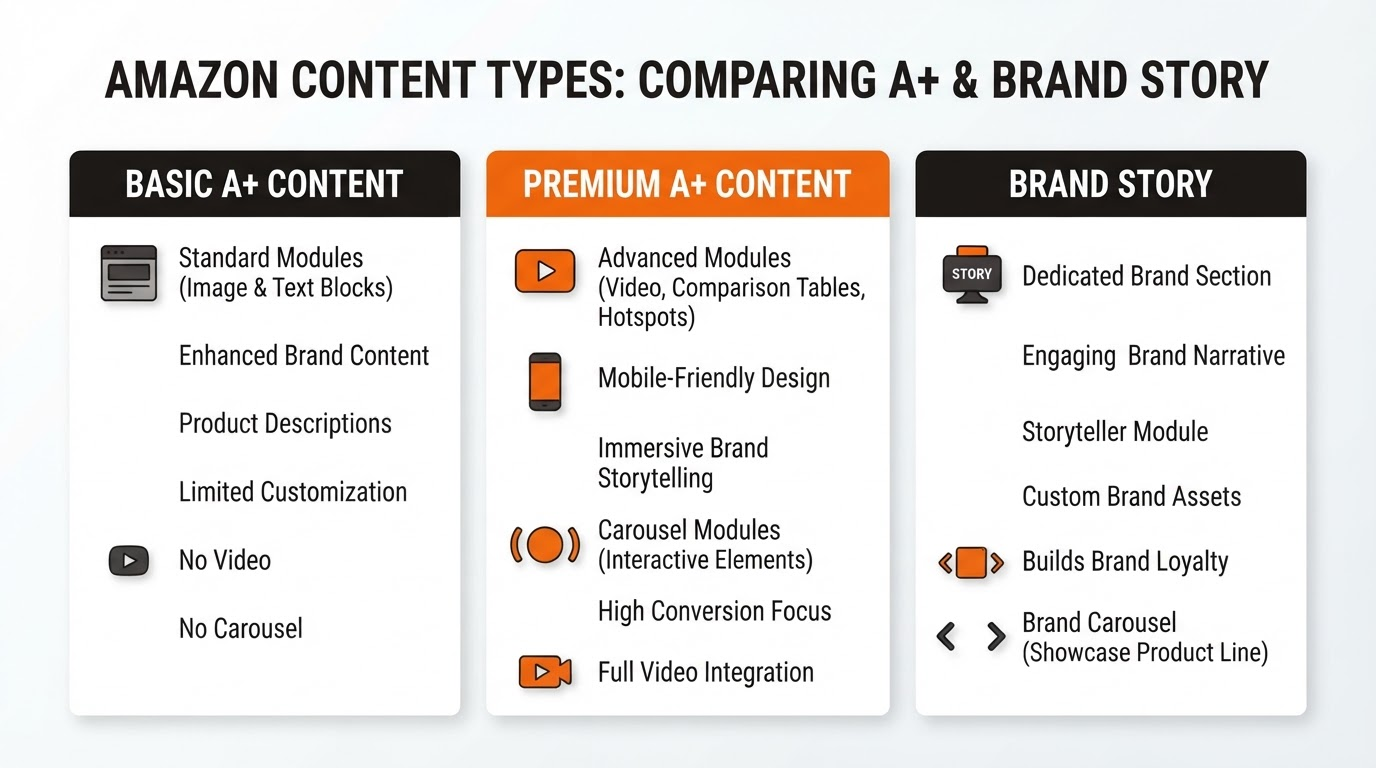
Amazon's content hierarchy rewards Brand Registry owners who master these tools. Basic A+ content delivers simple modules below the fold. Premium A+ content unleashes advanced visuals and comparisons. Brand Story hooks shoppers from the top. Used together, they create a seamless narrative that guides buyers from curiosity to purchase. Let's break it down systematically.
Related reading: Basic vs Premium A+ Content differences.
What is Basic A+ Content?
Basic A+ content—Amazon's entry-level enhanced content—lets Brand Registry sellers replace the standard bullet points and images with customizable modules. Think of it as your listing's reliable workhorse: up to five content tiles stacked vertically on the product detail page.
Each module supports text, images, or a mix. Standard image-and-text blocks allow four images per module, paired with descriptive copy. You can highlight features, benefits, or specs without coding. No videos, no fancy layouts—just clean, scannable enhancements that lift engagement by 5-10% on average for qualifying listings.
Launched years ago, Basic A+ content democratized rich media for brands. It's straightforward: upload via Seller Central, preview, and publish. Ideal for new registrants testing the waters, but it caps creativity where competitors pull ahead with Premium options.
What is Premium A+ Content?
Premium A+ content elevates the game, offering a creative command center for sophisticated storytelling. Exclusive to select brands, it expands to seven or more modules with pro-grade elements: comparison charts, ingredient lists, videos, and lifestyle imagery that pop.
Why the upgrade? Premium modules support up to nine images per block, dynamic text overlays, and interactive tables. Videos embed directly, autoplaying silently to captivate mobile shoppers. Brands like kitchenware sellers showcase before-after demos; beauty lines detail routines. Conversion lifts hit 20%+ as buyers visualize products in their lives.
Access demands stricter criteria—more on that later—but tools like our ASIN to Premium A+ generator simplify creation. Review before you upload to ensure compliance and impact.
For pros, Premium A+ content isn't optional; it's the edge in crowded categories.
What is Brand Story?
Brand Story sits apart as Amazon's above-the-fold billboard. This full-width module appears right under the product title and prime badge, before bullets or A+ content kicks in. It's a 300-600 word narrative with hero images, telling your brand's origin, mission, and values.
No modules here—just one cohesive canvas. Embed five images, weave in ethos (e.g., "From family farm to your table"), and link to storefronts. It builds trust instantly, humanizing commoditized products. Think Patagonia-style storytelling that boosts repeat buys.
Unlike A+ content, Brand Story is always visible, even on search results previews. It's your listing's emotional anchor, priming shoppers for the details below.
Key Differences: Premium A+ content vs Basic A+ content vs Brand Story
Side-by-side clarity reveals why premium a plus vs a plus matters. Here's the definitive comparison:
| Feature | Basic A+ | Premium A+ | Brand Story |
|---|---|---|---|
| Max Modules | 5 | 7-9 | 1 (narrative) |
| Images per Module | 4 | 9 | 5 total |
| Video Support | No | Yes (embedded) | No |
| Advanced Layouts | Text/Image only | Charts, tables, overlays | Full-width story |
| Location on Page | Below fold | Below fold | Above fold |
| Eligibility | Brand Registry | Registry + metrics | Brand Registry |
| Best For | Quick enhancements | High-conversion visuals | Brand trust-building |
This table spotlights why amazon premium a+ vs basic tilts heavily toward Premium for scale.
Where They Appear on the Listing
Placement dictates impact. Brand Story commands prime real estate: under title, images, and price—visible on 80% of desktop/mobile loads. It scrolls with the product image carousel, grabbing attention in 3 seconds.
Basic and Premium A+ content modules load post-"Add to Cart" button, replacing bullets. They stack sequentially, with Premium's richer media filling more vertical space. Mobile users swipe through, but desktop shoppers scan fully. Stacking all three? Brand Story sets the stage, A+ content closes the sale.
Eligibility Requirements
Basic A+ content Checklist
- Enrolled in Amazon Brand Registry
- Active ASIN with no policy violations
- Access via Seller Central > Advertising > A+ Content Manager
- No performance gates—immediate approval post-preview
Premium A+ content Checklist
- Brand Registry enrollment (check Premium A+ content modules and eligibility)
- ASIN sales velocity: 100+ units/month or equivalent
- Low cancellation/refund rates (<2.5%)
- Video uploads or high-res assets often required
- Amazon approval (1-2 weeks)
Brand Story Checklist
- Brand Registry verified
- Storefront live (optional but boosts approval)
- Content <600 words, 5 images max
- Instant access, live after review
When to Use Which: The Stacking Strategy
Don't choose—stack. Start with Brand Story for instant trust (every eligible listing). Layer Basic A+ content for specs if Premium lags. Unlock Premium A+ content for traffic-heavy ASINs, prioritizing hero products.
Stacking blueprint: Brand Story hooks (origin story). Premium A+ content educates (features via charts/videos). Basic fills gaps. Agencies scale this across portfolios, targeting 37%+ conversion bumps. Test via Brand Analytics: watch session depth and BSR climbs.
Best Practices for Maximum Impact
Prioritize mobile: 70% traffic. Use 16:9 images, concise copy (20-50 words/module). A/B test headlines. Videos under 30s, no sound. Align with PPC keywords. Refresh quarterly per season/trends. Audit competitors via Keepa—replicate winners, innovate.
- Hero image first: lifestyle over product shots
- Benefits beat features: "Sleep deeper" vs "10 layers"
- CTAs subtle: "Discover more below"
- Compliance: No prices, links, superlatives
Pro tip: Use data-driven tools to iterate fast.
How Premium A+ content Forge Fits into Your Strategy
Enter Premium A+ content Forge, our powerhouse at amzaplus.com. This AI-driven suite scans your ASIN, generates compliant modules in minutes—from comparison tables to video placeholders. No designers needed. Upload, review before you upload, publish. Agencies convert 50 ASINs weekly, slashing production time 90%.
It's your shortcut to amazon brand story vs a+ content mastery. Start stacking today—your listings demand it.
Frequently Asked Questions
Can I use Basic A+ content and Premium A+ content together?
No—Premium replaces Basic on the same ASIN. Apply for Premium upgrade once eligible.
Does Brand Story require Premium A+ content?
No, it's independent. Stack freely for full coverage.
How long for Premium A+ content approval?
1-14 days. Boost chances with strong sales data.
What's the ROI on these content types?
Basic: 5-12%. Premium: 15-37%. Brand Story: 8-20% trust lift.
Can agencies manage for clients?
Yes—delegate via Brand Registry invites. Tools like Forge streamline.
Master these, and your listings won't just compete—they'll convert relentlessly. Time to upgrade.